Email Link Issues With Approvals and Cancelations

Hi!
I've discovered the {approve_appointment_url} and {reject_appointment_url} codes are delivering different results when used in a <a> link. I've followed the directions and added this in the Text tab of the email editor:
<a href="{approve_appointment_url}">Approve Appointment</a>
When the email arrives, this is the source code that is generated:
<a href=3D"http://url9917.[thisisthecorrectdomain.com]/ls/click?upn=3DXJ0ky4AmaYQLBh9-2= FX0ygBO-2B-2BDt[text removed for display]HTvxu2MRXdM5rdFM66mtzQ= -3D-3D">Approve Appointment</a>
Notice the beginning of the link. It should be "https://www.[thisisthecorrectdomain.com]" but instead it becomes "http://url9917.[thisisthecorrectdomain.com]"
But when I put the same code in the visual editor (to display the actual link), it works properly, generating the correct url.
Screenshot of received email: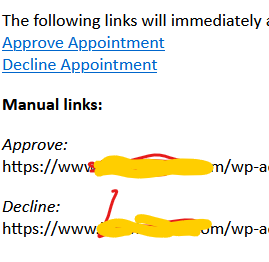
screenshot of the email source code:
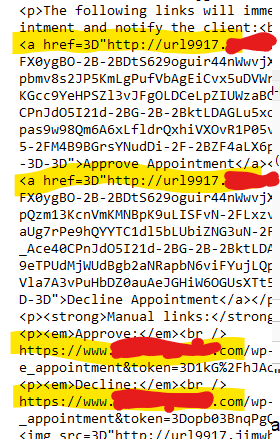
Where did that strange url9917 come from, and why did it change to non-secure (https to http)?
Quite strange!
Comments
Hello, Jim. It looks like url9917 comes from the global settings of your WP site. Bookly takes the link from WordPress. If you need our technical team to look deeper into your settings, please create a support request here https://support.booking-wp-plugin.com/hc/en-us/requests/new
Please sign in to leave a comment.