Is it possible to select thge employee first and then the service? Please help.

Hi.
I am running a clinic in Lisbon.
I have about 12 psychotherapists and they don't agree either on the duration of the psychotherapy sessions or on price.
Besides that, some of them discriminate between the price of first session and the follow-up sessions, some discriminate between sessions with weekly frequency and bi-weekly frequency.
So, if the first drop-down menu for the clients is the service's one it gets really confusing because you will have a lot of similar services with different prices because they are twelve and don't agree on anything.
So, would it be possible for the patient first having to choose the therapist (employee) on the first dropdown menu and ony then on the second dropdown menu the client would have to choose between 2 or 3 services of that specific therapist?
(please see the attachment) http://shorturl.at/tzNU2
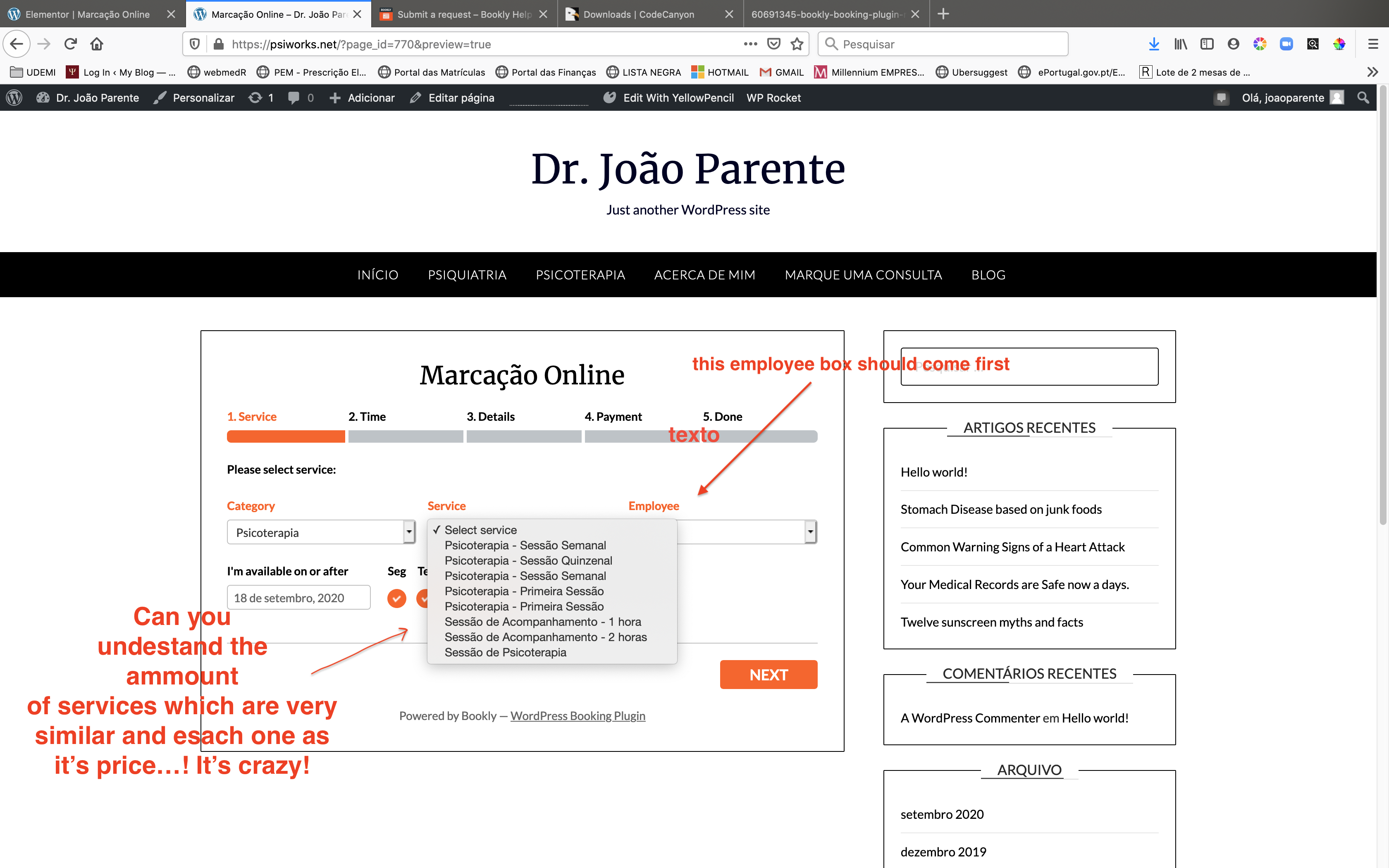
This would be much better for my clinic.
Is this possible
If Bookly doesn’t allow this do you think there is any other way to go around this using Bookly
Thank you.
Comments
Hello,
Thank you for your message.
Which form do you mean? If you mean [bookly-form], it is working correctly, you can hide staff members field:
Will be waiting for your reply.
There is no option to change the order of the fields. Or make Employee field to be chosen first. You can leave your request here: https://ideas.booking-wp-plugin.com/boards/feature-requests and if it gets enough votes, it might be implemented in the future release.
Hi Jspar
I have this solution custom made on two sites and it works fine. We have to update it after the last update of Bookly from 18.6 to 18.8 should be ready again next week.
Hi Jspar
Did you manage to get a solution to this. I really need to get a solution as well. will appreciate your feedback
Hi Sigurdur Erlingsson. Can you help me on this? I didn't understand very well how to do it.
Aziz Williams: No. Not yet.
Hi Jspar and Aziz Williams
Sorry for late respond, but this email did go to the junk malifolder. Yes I have this function you can see it working on this site https://kompaniid.is and https://bold.is
It is in Icelandic (the websites) but at least you can see that the staffmember come first, then catagory and then service.
Hello
Jspar yeah I agree with you I've been pulling hair too to change the booking flow, like selecting the staff first, or category first when using with Location Add-On.
Sigurður Erlingsson Nice! I can see you were able to set the employee first. And you even manage to put staff image in the booking form! Would you kindly share the work-around?
Sigurður Erlingsson?
You did it !
How did you do this?
Can you help me?
Your solution would solve my problems!
Would you be so kind to send me a tölvupóstur to jspar at heitur póstur?
I would be so grateful !
Joao
Hi Coach Hasymi
We did make special plugin that change the order in the booking form on the front end.
the staff image is just something that is in bookly standard. you just add the {staff_photo} in the booking form. just have to have the image around 100x100 px.
Hi Sigurður Erlingsson
Please can you share the plugin. I really need this
Okay. You have a special knowledge on coding which I don't :(
Would you consider helping me and Aziz?
Hi did anyone of you have any luck with choosing employee first? (Aziz Williams, Sigurður Erlingsson, Jspar)
Also - does your solution Sigurður - on https://kompaniid.is/ - support that each employee chosen first only shows their specific services they offer and not all services.
Any possibility that you can share your plugin or more info on how to achieve this - it would be fantastic! I have submitted this to Booklys feature request list and hope it will make it there so we all can vote on it. Valuable for many of us.
BR
Salomon - Stockholm / Sweden
Hi Salomon,
We are still using this on kompaniid.is. But some months ago Bookly come with new version that do not longer support to filter out only services for a specially selected employee. I have told them that but still they haven't fix that. So both my solution to select the staffmember first do not longer work as it should be. Also this option in Bookly to pre select staffmember and hide it in the frontend booking form do not longer work. Because this filter do not longer work as it did before. Hope the will fix it so this will work.
Br
Sigurdur
Thank you for the quick respons Sigurður Erlingsson !
Any chance you can share you plugin or make it available for us to buy from you in some way - if possible to use other sites if it is not too much of a super custom hack..?
Have you also submitted this functionality to the Booklys feature requests - if we are a few that does they might pick it up :-)
BR
Salomon
Hi Salomon
Send me emali to se@datastream.is
br
Sigurdur
To Support team
"Hello,
Thank you for your message.
Which form do you mean? If you mean [bookly-form], it is working correctly, you can hide staff members field:"
Yes I mean the bookly form, if I select one staffmember and hide when I set up the form, then bookly do not filter only the service that this staffmember provide, all services will be available, so if I choose a service that this employee (which I selected in the form) is not offering, then I will be stop there can't finist the booking. It used to be that if I selected a certain employee and hide him, bookly only displayed the services he is offering.
Please sign in to leave a comment.