How can I show the full calendar on frontend product page for easier customer booking

How can I show the full calendar on frontend product page for easier customer booking.
Ideally the calendar would shot the next available date with available times to the right of the calendar.
Currently the product page looks like this:
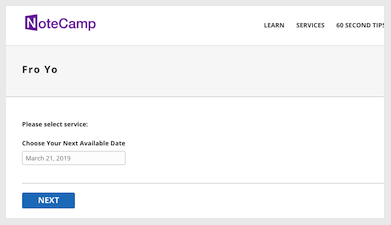
How ever I want it to look like this:
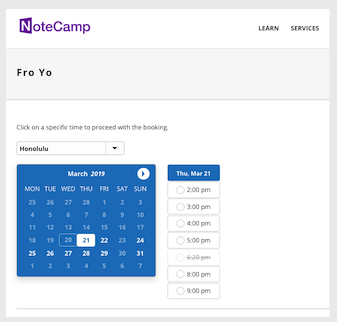
Thanks!!!!
Todd
0
Comments
Did you figure this out? It looks like you can add it :
Appearance < Time < check the show Calendar box
This will only make the calendar in step 2 show. Step one still looks ridiculous...
I cannot understand why you don't see available times in first step? Otherwise its completely useless to have the calendar there? They must fix this?
Hello,
Thank you for your message.
If you mean that your want to hide first step, please check this instruction: https://support.booking-wp-plugin.com/hc/en-us/articles/212800185
Don't forget to choose default notions for the fields which you want to hide.
Let me know if I understood your request correctly.
Please sign in to leave a comment.