Booking Times Too Literal

Hello, I have set up my time under my business and as the staff member to be available from 12am-12am and I've set my staff breaks between 2am-11am so that the working hours are between 11am-2am. It is fairly confusing for people to book the 12am-2am slot because the way it shows up under the time slots. Is there a way we can make it more practical and put the 12am-2am behind 11pm instead of at the top of the day.. (I hope this makes since.) The way it is setup now even I didn't understand for a while so I know clients are being confused. I will leave photos behind showing what I'm talking about. Thanks also. My website is wrldwav.com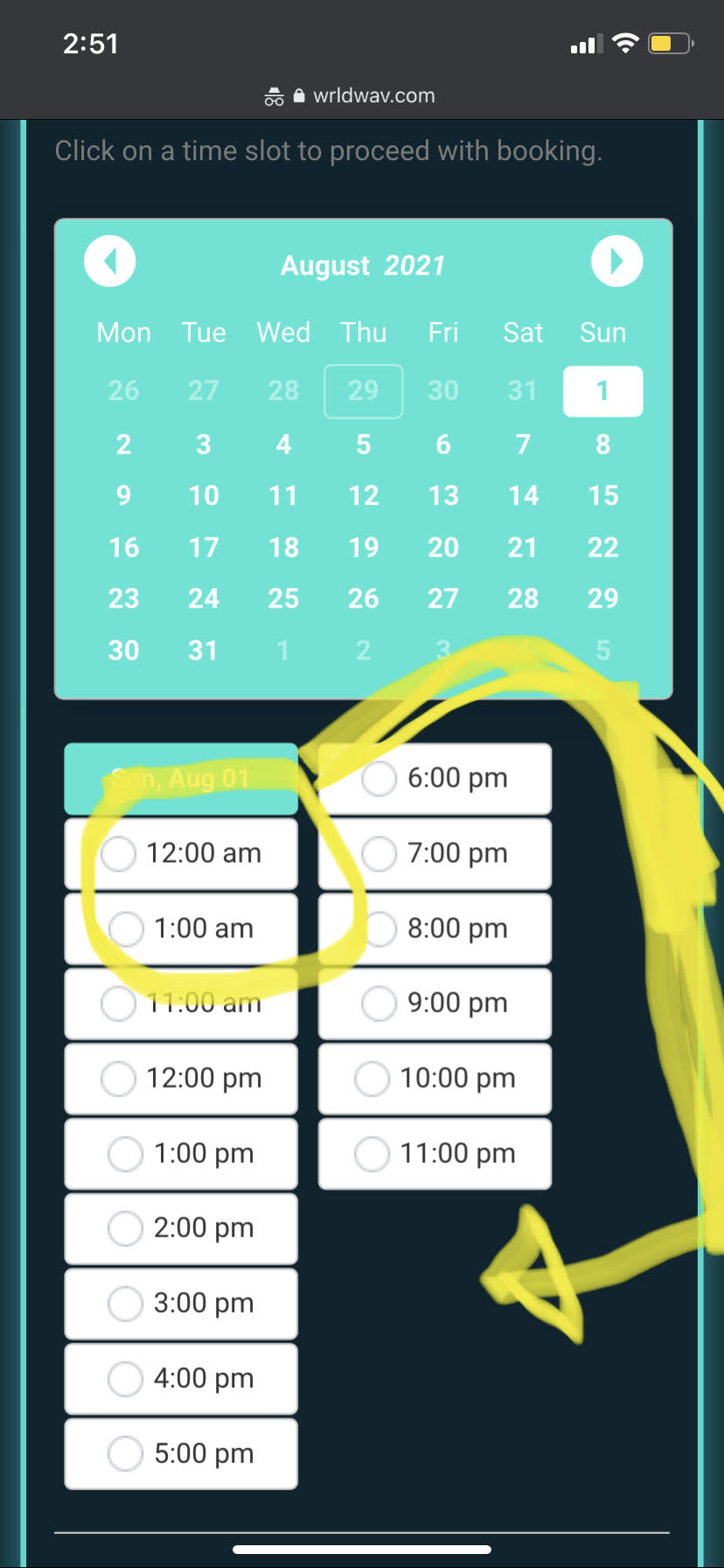
0
Comments
Hello Ted,
This is the correct behavior, because you staff schedule starts from 12am, so these slots (12am, 1am) are above the list. If you put the 12am-2am behind 11pm then it will be the next business day.
I definitely understand that it is correct but It's just not practical for people to catch that right away. It would be easier for everyone if they wanted to book tonight at 12 that it would come after 11pm instead of them having to go to the next business day to book it. It would honestly function way better.
Instead I have clients who assume I close down bookings at 11pm and thats the latest they can book.
In this case you can untick the Show calendar box in the Appearance section, so that customers see all available time slots right away.
Please sign in to leave a comment.