Grey out Unavailable Dates

Is there a setting to gray out unavailable dates so customers don't have to keep clicking through dates to find a day with available times?
0
Is there a setting to gray out unavailable dates so customers don't have to keep clicking through dates to find a day with available times?
Comments
Hello,
Thank you for your message.
You can check this option in Appearance section:
Let us know if it works for you.
I tried, but it didn't help. Here is an example.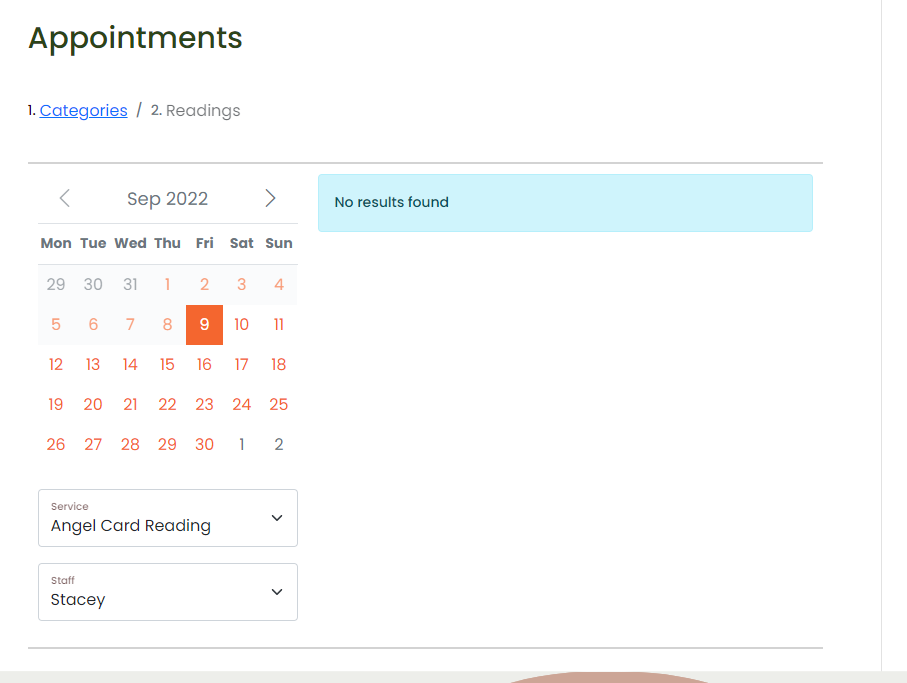
Stacey is only available for Angel Card Readings on the 10th and the 24th. A customer looking for an appointment time would have to click on every day of the month to figure that out. Why aren't the unavailable dates greyed out?
Hello,
Thank you for your reply.
Right now, such option is not supported. But it will be available in the future release.
Let us know if you have any other questions.
Hi I'm also looking for this option.
Right now my customer have to click to the whole calendar to find a suitable appointment.
Hello Yadi,
This is already implemented. Please check the screenshot below as an example, Nick Knight is not available between Feb 13-21 as well as on weekends.
Hi for me this is not working.
It for a self employed company they don't have staff and only work alone. Their customer isn't seeing the days that are fully booked. When I set the days to unavailable such as vacations then it reflects by greying out. But if a service doesn't fit on a working day then it's not greyed out.
Greetings Yadi.
https://www.hair2beauty.be/online-afspraak/
Hello Yadi, we'll check the reported behavior and get back to you.
I guess this is only possible using the step by step form and not the services form correct ?
Hello Yadi, today we released a new Bookly PRO version 7.7 with a new setting for the modern booking forms: Appearance > Calendar > Available dates in calendar. If you choose 'Disable dates without available timeslots', then Bookly will grey out all busy days. Please check and let us know how it works for you.
This is great news ! and will bring more value to your product.
Hello, I have the same issue and I came across this article about it.
I am running bookly pro version 8.2.
So my issue is this, I am trying to create a new bookly service form.
On the Calendar section if you can see on the 7th of Sept only 2/3 barbers are available
and if I use the dropdown list to select the 3rd barber it correctly displays "No Results found" but shouldn't the date "7th Sept" be unavailable to click on?
In appearance > service form > calendar tab I followed the advise on the above comment mentioning to select "Disable dates without available timeslots" but it doesnt seem to work for me
Hello Nicholas, based on the settings you described, the system should disable the date for any staff who are not working on that day. Please create a support ticket here, and we'll investigate the reported behavior on your end.
I don't get it, people are waiting 2 years to fix this simple problem, if date is fully booked then make option to automaticly "style disabled = true", now imagine i have 3 months fully booked and only 1 day still have free slot, but client need to press true every date to find the free time slot... in modern booking form. And it would be nice to add also in every date like small progress bar of changing color, like if can book max 3 apointments in day, and 2 are booked, and 1 is free then color out that date 66% of diffirent color.
whats the solution know? It dont works! Yardi, I saw at the page of your customers that it works. What you made?
Why is this option not available for the step by step form? It is just as important and surely just as easy to implement.
Please sign in to leave a comment.